
The Package Ecosystem
Pkg: a package manager built into the standard library, an environment system that records exactly what a project needs, and a registry that turns a name into a versioned, downloadable, tested package. This lesson is the plumbing — and the plumbing is what makes a project still work six months later on somebody else's laptop.
Most languages bolt a package manager on afterwards; Julia was designed with one from the start. That difference shows in daily work. Environments are cheap and disposable, the manifest records the whole dependency graph rather than a list of names, and the unit of organisation — the project — is the same thing whether you are writing a throwaway script, a thesis chapter, or a registered package.
Packages and Projects
A project is a folder with a Project.toml. A package is a project that also has a name, a UUID, a version, and code in the expected places. You start with the first and grow into the second when the code is worth sharing.
What a Package Is
A Julia package is not a special kind of artefact. It is a folder that follows a convention the loader and the package manager both understand.
# The minimum viable package layout
#   MyPackage/
#     Project.toml        # name, uuid, version, [deps], [compat]
#     src/MyPackage.jl    # module MyPackage ... end
#     test/runtests.jl    # the test entry point
#     docs/               # optional documentation

# src/MyPackage.jl — the module that carries the package name
module MyPackage

export greet

"""
    greet(name::AbstractString) -> String

Return a greeting for `name`. Every public function carries a docstring,
because the docstring is what `?greet` shows in the REPL.
"""
greet(name::AbstractString) = "Hello, $name!"

end # module

# test/runtests.jl — the single entry point every CI system calls
using Test
using MyPackage

@testset "MyPackage" begin
    @test greet("Julia") == "Hello, Julia!"
end
The naming rule matters more than it looks: the module name must match the file name and the package name exactly, including capitalisation. Nothing here is magic — it is a convention that lets using MyPackage find the right file without any configuration.
Creating a Package
Nobody hand-writes the scaffolding. Pkg.generate creates the folder, the module, the UUID, and the test skeleton, and leaves everything afterwards to you.
using Pkg

# Create a package in the current directory
Pkg.generate("MyPackage")

# The generated Project.toml contains:
#   name = "MyPackage"
#   uuid = "0c0f3f10-8f5e-4a0a-9f6e-1f2b3c4d5e6f"
#   authors = ["Your Name <you@example.com>"]
#   version = "0.1.0"

# The UUID is permanent: it identifies the package even if the name changes.
# Never copy a Project.toml between packages — always generate a fresh UUID.

# A project with no name is an "application", not a package:
#   ./
#     Project.toml     # only [deps]; no name, no uuid, no version
#     main.jl
# Applications are not loaded by name with `using`.
That last distinction is the one people get wrong. An application — a script or a service — needs only a Project.toml listing its dependencies. A package — something another project can depend on — needs name, UUID, and version. Adding a UUID to a script's project does nothing useful; removing it from a package's project breaks every consumer.
Reading the Project File
Project.toml is short enough to read at a glance, and reading it is the fastest way to understand an unfamiliar Julia repository.
# A typical Project.toml, annotated

name = "MyPackage"
uuid = "0c0f3f10-8f5e-4a0a-9f6e-1f2b3c4d5e6f"
authors = ["Your Name <you@example.com>"]
version = "0.1.0"

[deps]                                # direct dependencies only
DataFrames = "a93c6f00-e57d-5684-b7b6-d8193f3e46c0"
Dates = "ade2ca70-3891-5945-98fb-dc099432e06a"

[compat]                              # version ranges this package promises
DataFrames = "1"
julia = "1.10"

[extras]                              # dependencies used only by the tests
Test = "8dfed614-e22c-5e08-85e1-65c5234f0b40"

[targets]                             # which extras belong to which environment
test = ["Test"]
Two details are worth memorising. Dependencies are keyed by UUID, not by name: the name is a hint for humans, the UUID is the identity. And [compat] is the promise you make to everyone who depends on you, so it belongs in every package from its first release.
Environments and Reproducibility
An environment is the set of packages a piece of code is allowed to see. Julia lets you keep as many as you like, isolated from each other, without a virtual machine per project.
Creating and Activating Environments
Every project folder is an environment; the only question is whether it is the active one right now.
using Pkg

# The active environment's file (the global one by default)
Base.active_project()

# Activate the environment defined by a folder's Project.toml
Pkg.activate(".")
Pkg.activate("experiments/machine-learning")   # any path works

# Activate a shared named environment instead
Pkg.activate()                                 # @v1.11, the default
Pkg.activate("myenv")                          # ~/.julia/environments/myenv

# A temporary environment that leaves the current one untouched
Pkg.activate(temp = true)

# Add packages to the ACTIVE environment only
Pkg.add("DataFrames")

# See what this environment contains
Pkg.status()

# The REPL equivalent is the `]` mode
#   ] activate .
#   ] add DataFrames
#   ] status
The habit that prevents most trouble is to activate the project before adding anything. Running using DataFrames from a different active environment is the usual reason a notebook "works on my machine": the package is installed somewhere, just not here.
Manifest and Pinning
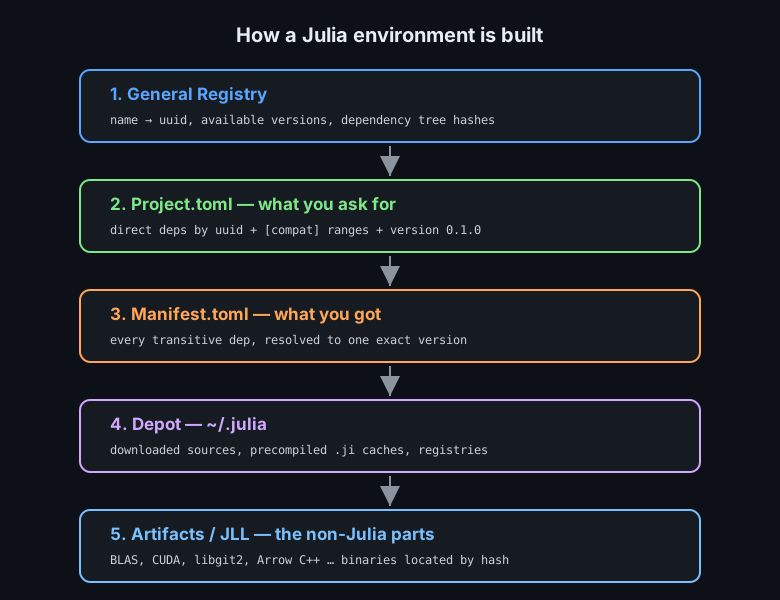
Project.toml records what you asked for. Manifest.toml records what you actually got, including every transitive dependency at an exact version.
# After `Pkg.add("DataFrames")` the folder holds both files:
#   Project.toml    → DataFrames = "a93c6f00-..."   (one line, direct dep)
#   Manifest.toml   → DataFrames v1.6.1, plus
#                     Compat v4.13.0, InlineStrings v1.4.0, ...
#                     every transitive dependency, resolved and recorded

# Pin a version so instantiate cannot move it
Pkg.pin("DataFrames")            # or Pkg.pin(name = "DataFrames", version = v"1.6.1")
Pkg.free("DataFrames")           # release the pin again

# Update within the [compat] bounds — never past them
Pkg.update()

# Which recorded packages moved since the last commit?
Pkg.status(outdated = true)

# VERSION RULE FOR GIT
#   packages and libraries → commit BOTH Project.toml and Manifest.toml
#   applications           → commit Manifest.toml too; it IS the build
Pinning is a maintenance tool, not a strategy. A pin that is never released turns a routine update into archaeology. Use it when a known regression exists, and record why in the commit message rather than in your head.
using statement.Reproducing an Environment
The test of an environment is whether a stranger can rebuild it. That is exactly what instantiate does, and it is the first command to run in any Julia repository you did not write.
# Fresh clone, empty depot, one command
#   julia --project=. -e 'using Pkg; Pkg.instantiate()'
#   julia --project=. -e 'using Pkg; Pkg.test()'

# What to do when the manifest is stale or corrupt
Pkg.resolve()                    # re-resolve against the current Project.toml
Pkg.instantiate()                # then reinstall exactly

# CI runs the same two commands, with a cached depot for speed
#   - uses: julia-actions/setup-julia@v2
#   - uses: julia-actions/cache@v2
#   - run: julia --project=. -e 'using Pkg; Pkg.instantiate()'
#   - run: julia --project=. -e 'using Pkg; Pkg.test()'

# What NOT to do: delete Manifest.toml to "fix" a version conflict.
# That throws away the only record of the environment that worked.
When instantiate fails, the failure is information: either a package is missing from the registry, or the versions you recorded no longer satisfy the compat bounds you changed. Read the resolver's message before editing files.
The General Registry
The General registry is a single Git repository of metadata — not code. It records which packages exist, under which UUIDs, and which versions each has published, together with the dependency information needed to resolve a version.
Finding Packages
Searching from inside the REPL beats searching the web, because the results come from the registry your project actually uses.
using Pkg

# Search names, descriptions and keywords in all loaded registries
Pkg.search("plot")               # or press `]` then `? plot`
Pkg.search("dataframe")
Pkg.search("differential equations")

# Inspect a package before adding it
Pkg.Registry.status()            # which registries are installed
Pkg.status("DataFrames")         # is it already here, and at which version?

# Ask what a package name resolves to, and what versions exist
using Pkg.Registry
Pkg.dependencies()               # the resolved graph of the active environment

# The registry lives in the depot; update it independently of packages
Pkg.Registry.update()
Two habits pay off here: read the package's documentation page before adding it, and check its [compat] table for the Julia versions it supports. A package whose last release predates your Julia version is a candidate for trouble, and the resolver will tell you so at install time.
Registries and Versions
A registry is itself versioned, and it is not the only one. The General registry covers the public ecosystem; private registries cover company-internal packages; a local registry covers a team's shared code.
using Pkg

# General is installed by default; add another registry by URL
Pkg.Registry.add("General")
Pkg.Registry.add(RegistrySpec(url = "https://github.com/MyCompany/MyRegistry"))
Pkg.Registry.add(RegistrySpec(path = "/srv/registries/local"))

# Remove one you no longer use
Pkg.Registry.rm("MyRegistry")

# Refresh metadata without changing installed versions
Pkg.Registry.update()

# Where the registries sit on disk
#   ~/.julia/registries/General.toml
#   ~/.julia/registries/MyRegistry/
Because the registry is just metadata in Git, a private registry gives you the whole public workflow — versions, compat, resolution, reproducible installs — for code that never leaves the company network.
Semantic Versioning
Julia follows semantic versioning strictly, and this is the rule that governs every upgrade decision you make.
# MAJOR.MINOR.PATCH            example: 1.6.2
#
#   PATCH  1.6.1 → 1.6.2   bug fix only; always safe to take
#   MINOR  1.6.2 → 1.7.0   new features, still compatible; safe to take
#   MAJOR  1.7.0 → 2.0.0   breaking change; may require code edits

# What a compat bound means
#   "1.6.2"      → exactly 1.6.2        (over-specific, rarely wanted)
#   "1.6"        → [1.6.0, 2.0.0)       (safe within major 1)
#   "1"          → [1.0.0, 2.0.0)       (the usual bound for a stable lib)
#   "0.4"        → [0.4.0, 0.5.0)       (0.x: minor bumps may break)

# 0.x is special: before 1.0 the minor version behaves like a major one.

# Check before upgrading an application
using Pkg
Pkg.status(outdated = true)      # what has newer versions available
Pkg.update("DataFrames")         # move one package within its bounds
Dependencies in Practice
The commands are short. What matters is the order you run them in and the file each one changes.
Adding, Updating, Removing
Every operation is scoped to the active environment, which is why activating first is not optional.
using Pkg

# Add a dependency to the ACTIVE environment
Pkg.add("CSV")                          # newest version satisfying compat
Pkg.add(name = "CSV", version = "0.10") # a specific version range
Pkg.add(url = "https://github.com/JuliaData/CSV.jl")   # straight from git

# Add something that is only needed by the tests
Pkg.add("Test"; target = :test)

# Update one package, or everything within compat
Pkg.update("CSV")
Pkg.update()

# Remove it from Project.toml and the manifest
Pkg.rm("CSV")

# Resolve a conflict without changing Project.toml
Pkg.resolve()

# A shortlist of behaviours worth knowing
#   Pkg.add twice is a no-op, not an error
#   Pkg.rm on a package that is not a direct dep warns; it still cleans the manifest
#   adding a package for one experiment in a shared environment pollutes everyone
The last comment is why per-project environments exist. An experiment that needs ten extra packages belongs in its own environment, activated only while that experiment runs.
Compat Bounds
[compat] is the difference between a package that survives a year and one that breaks on somebody else's machine. The bound you write is a claim that your code works with any version in that range.
# [compat] in Project.toml — bound every direct dependency
[compat]
CSV = "0.10"
DataFrames = "1"
julia = "1.10"

# Rules that keep bounds honest
#   1. Bound every direct dependency; an unbounded dep breaks on any major bump.
#   2. Never bound the standard library (Dates, LinearAlgebra, ...) — it ships
#      with Julia and follows the julia bound instead.
#   3. Prefer the major-only form "1" unless you genuinely need a floor.
#   4. Add a floor only for a feature you actually use: "1.1" means 1.1 features.
#   5. Check the bound with Pkg.test() using the oldest supported Julia.

# Find out what is out of date relative to the registry
Pkg.status(outdated = true)

# What does the resolver think the bound allows right now?
Pkg.instantiate()
Pkg.status()
Rule 2 surprises people coming from other ecosystems, and it is worth repeating: standard-library packages are pinned to the Julia version, so a compat entry for them is ignored or rejected. Bound the third-party packages; bound julia itself.
Developing a Local Package
When your project and a library must change together, Pkg.develop puts the library's working copy into the environment instead of a released copy.
using Pkg

# Replace the registry version with a local working copy
Pkg.develop(path = "../MyPackage")

# Or a git checkout of a branch
Pkg.develop(url = "https://github.com/me/MyPackage.jl")

# Confirm where the dependency now comes from
Pkg.status()

# Back to the released version when the work is done
Pkg.free("MyPackage")

# Typical loop while developing both sides at once
#   1. Pkg.develop(path = "../MyPackage")
#   2. edit ../MyPackage/src/... and `using MyPackage` re-loads on rev
#   3. run the dependent project's tests
#   4. Pkg.free("MyPackage") once the release exists

# The manifest records a develop entry as a path, not a version.
# Do not commit a manifest full of develop paths: other machines
# do not have your folder layout.
Artifacts, Extensions and Startup
Three mechanisms explain most of what happens the first time a package loads: artifacts supply binaries, extensions split optional integration code, and precompilation turns Julia source into caches.
Binary Artifacts
Julia packages that wrap C or C++ libraries rarely ship those libraries themselves. They declare an artifact, and the package manager downloads the right binary for your platform.
# Inside a package: declare an artifact in Artifacts.toml
# [[arrow]]
# arch = "x86_64"
# git-tree-sha1 = "3f0c9e..."
# lazy = true
# [[arrow.download]]
# url = "https://github.com/.../arrow-15.0.0-x86_64-linux.tar.gz"
# sha256 = "9e1c..."

# Locate it at run time — the path differs per machine and per platform
using Artifacts

root = artifact"arrow"
libdir = joinpath(root, "lib")

# Ask for one lazily, if the declaration set lazy = true
arrow = @artifact_str("arrow")

# The JLL convention: `XYZ_jll` packages wrap one C library each and
# expose the library path so ccall/bindings can find it:
#   using Arrow_jll   →   Arrow_jll.libarrow is the shared object path
#   Arrow_jll.Arrow_jll   →   the wrapped path

# Where artifacts live on disk
#   ~/.julia/artifacts/<git-tree-sha1>/
The reason to know this: JLL packages are ordinary packages as far as Pkg is concerned, so the same versioning, pinning, and instantiate rules apply. That is how a CUDA runtime or a BLAS implementation becomes a dependency line instead of an installation guide.
Package Extensions
An extension is a piece of a package that only loads when another package is present. It replaces the old "requires" pattern and it removes a whole class of heavy, unconditional dependencies.
# In the package's Project.toml

[weakdeps]                       # optional peers, may be absent
DataFrames = "a93c6f00-e57d-5684-b7b6-d8193f3e46c0"

[extensions]
MyPlotDataFramesExt = "DataFrames"    # loads only if DataFrames is loaded

# ext/MyPlotDataFramesExt.jl
module MyPlotDataFramesExt

using MyPlot
using DataFrames

# Add a method to the package's generic function for DataFrame input.
# Nothing in the base package mentions DataFrames.
MyPlot.render(df::DataFrame; kwargs...) = MyPlot.render(collect(eachcol(df)); kwargs...)

end
The design lesson is worth carrying into your own code: define the generic function in the base package, and put every integration with an optional dependency in an extension. Users who never touch DataFrames never pay for it — not in load time, and not in install size.
Precompilation and Load Time
Julia compiles methods on demand, which makes the first call slow and every later call fast. Precompilation front-loads part of that cost into a cache that is reused across sessions.
# Precompile every dependency of the active environment
using Pkg
Pkg.precompile()

# Precompile a loaded package graph right now
using SnoopPrecompile      # or Base.precompile in recent versions
@precompile_setup begin
    @precompile_all_calls begin
        # put typical WORKLOADS here, not synthetic ones
        run_a_typical_query()
    end
end

# Measure what precompilation actually costs
#   julia --project=. -e 'using Pkg; Pkg.precompile()'
#   time julia --project=. -e "using MyPackage"

# Why a package recompiles every launch
#   - the source changed (edit to any dependency)
#   - the Julia version changed
#   - a different set of flags or preferences is in effect

# Store caches in a shared, persistent place in CI and containers
#   JULIA_DEPOT_PATH=/cache/julia
Publishing and Maintenance
Shipping a package is a process, not an event: documentation, tests, continuous integration, then a version bump and a registry pull request.
Documentation and Docstrings
Documenter.jl builds a static documentation site from your docstrings, plus the prose pages you write next to them.
# docs/make.jl — the entry point that builds the site
using Documenter
using MyPackage

makedocs(
    sitename = "MyPackage.jl",
    modules  = [MyPackage],
    pages = [
        "Home"        => "index.md",
        "User guide"  => "guide.md",
        "API"         => "api.md",
    ],
    strict = true,             # fail the build on a broken docstring reference
)

deploydocs(repo = "github.com/me/MyPackage.jl", devbranch = "main")

# In the docs: a doctest is an executable example
#   ```jldoctest
#   julia> greet("Julia")
#   "Hello, Julia!"
#   ```
# doctest = true runs every one of them during the docs build,
# so documentation cannot drift away from the actual output.
Doctests are the cheapest correctness check you will ever add to a README: they turn examples into tests, and a change in behaviour fails the documentation build instead of silently misleading readers.
Continuous Integration and Release
The standard Julia CI workflow runs the tests on several Julia versions and operating systems. Releasing is then a version bump in Project.toml and a pull request to the registry.
# .github/workflows/ci.yml — the shape of the standard workflow
#   on: [push, pull_request]
#   jobs:
#     test:
#       strategy:
#         fail-fast: false
#         matrix:
#           version: ['1.10', '1', 'nightly']
#           os: [ubuntu-latest, windows-latest, macos-latest]
#       steps:
#         - uses: actions/checkout@v4
#         - uses: julia-actions/setup-julia@v2
#           with: { version: '${{ matrix.version }}' }
#         - uses: julia-actions/cache@v2
#         - uses: julia-actions/julia-buildpkg@v1
#         - uses: julia-actions/julia-runtest@v1
#         - uses: julia-actions/julia-processcoverage@v1

# Releasing:
#   1. bump `version` in Project.toml (0.1.0 → 0.1.1)
#   2. commit, push, and tag it:  git tag v0.1.1
#   3. file the registry pull request — Registrator.jl does it from the
#      commit message:  @JuliaRegistrator register
#   4. the registry runs AutoMerge; a clean CI run merges automatically

# A registry release is immutable: you can never overwrite v0.1.1.
# Yanking withdraws it for new resolves; it does not delete the version.
The immutability rule shapes how you plan releases: test the tag before creating it, because the only way to fix a published version is to publish the next one.
Common Pitfalls
The mistakes below account for nearly every "it worked yesterday" story in a Julia project.
| Symptom | Cause | Fix |
|---|---|---|
Package X not found | It is installed in a different active environment | Pkg.activate(".") then Pkg.instantiate() |
| Works locally, fails in CI | Manifest.toml not committed | Commit both Project.toml and the manifest |
| Resolver cannot satisfy versions | Two packages demand incompatible majors | Read the resolver message; widen your own bound only if you really support it |
| Manifest full of local paths | A forgotten Pkg.develop | Pkg.free("MyPackage") before committing |
| Recompiles on every launch | Source or Julia version keeps changing | Pin the Julia version; cache JULIA_DEPOT_PATH in CI |
| Package works, docs fail | Doctest output drifted from reality | Run docs/make.jl in CI with strict = true |
Every one of these is prevented by the same two habits: activate the project before touching packages, and commit the two environment files together with the code they describe.
Project.toml; a package adds a name, a UUID, a version, and the src/ layout. Environments isolate sets of packages, Project.toml states what you asked for, and Manifest.toml records exactly what you got — commit both. The General registry maps names to UUIDs and versions, and semantic versioning decides what an upgrade may safely change. Bound every third-party dependency in [compat], never the standard library. Use artifacts and JLL packages for non-Julia binaries, extensions for optional integrations, and precompilation as a cache for warm start-up. Publish with docstrings, doctests, and CI, and remember that a released version is immutable.
Next, make that code trustworthy: the Testing & Debugging lesson turns a working package into one you can change without fear.