
Data Types
Any. That tree is the backbone of the whole language: method dispatch walks it, the compiler reasons over it, and packages extend it to describe their own data. There is no primitive/object split as in Java — a number, a string, and a struct you define are all nodes in the same hierarchy.
This lesson teaches the tree, then the scalar types that live in it, then the two tools that let you use types rather than merely know them: unions and annotations. The final sections show how to interrogate the hierarchy from the REPL and the traps that catch beginners, starting with integer overflow.
The Type Tree
Julia's types form a directed acyclic graph with a single root: Any. Every concrete type has exactly one direct parent, so the graph is really a tree, and <: — read "is a subtype of" — is the relation that walks it. Understanding three roles that types can play makes the rest of the chapter mechanical.
Any and the Root of Everything
Any is the most general type: every value is an Any. A container whose element type is Any, such as Vector{Any}, can hold anything — and pays for that flexibility by losing compile-time knowledge of what is inside, which costs performance.
1 isa Any              # true — everything is an Any
"text" isa Any         # true
Any isa Any            # true — the type is a value too

typeof(1)              # Int64      — the concrete type of the value
typeof(Any)            # DataType   — types are themselves values
Abstract vs Concrete Types
A concrete type is one you can instantiate: Int64, Float64, String, and any struct you define. An abstract type is a label for a set of types: Integer, Real, Number, AbstractString. You cannot create a value whose type is abstract, because an abstract type carries no layout information.
| Role | Keyword | Instantiable | Example |
|---|---|---|---|
| Abstract | abstract type | No | Number, Integer |
| Concrete primitive | built in | Yes | Int32, Float64, Char |
| Concrete composite | struct | Yes | String, your own structs |
| Parametric | type parameters | After binding | Vector{Int64} vs Vector |
# Integer is abstract: it describes a family, it does not store values.
# Integer(3)              # ❌ ERROR: MethodError — cannot instantiate abstract type

Int64(3) isa Integer       # true  — Int64 is one member of the family
UInt8(3) isa Integer       # true  — so is UInt8
3 isa Real                 # true  — Int64 <: Signed <: Integer <: Real

# `Vector` alone is a UnionAll — a family of vector types.
Vector isa DataType        # false
Vector{Int} isa DataType   # true
The distinction has a direct performance consequence. A struct field annotated with an abstract type stores a boxed pointer, because the compiler does not know the layout. A field annotated with a concrete type is stored inline. That single difference is the topic of the last section.
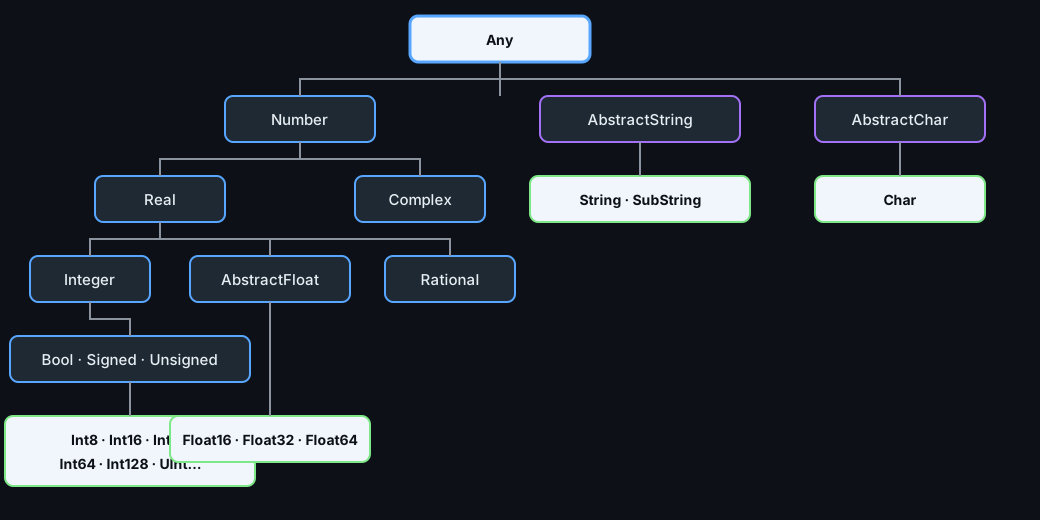
The scalar region of Julia's type tree. Dark boxes are abstract (labels for a family); light boxes are concrete (installable types). Bool is a subtype of Integer, and String belongs to AbstractString, not to Number.
Number Types
The numeric tower is deeper than in most languages and every level is a real, usable type rather than an emulation. Integer widths are explicit, rationals are exact, and complex numbers are built in — so the type you choose documents the precision the algorithm needs.
Integer Types & Overflow
Julia's integer types have explicit widths, and unlike Python's arbitrary-precision integers they wrap around on overflow rather than promoting. Int is an alias for the machine word size — Int64 on every 64-bit platform.
| Family | Types | Range notes |
|---|---|---|
| Signed | Int8 Int16 Int32 Int64 Int128 | Two's complement |
| Unsigned | UInt8 UInt16 UInt32 UInt64 UInt128 | No negative values |
| Word size | Int, UInt | Alias for 64-bit on modern hardware |
| Boolean | Bool | One byte; a subtype of Integer |
typeof(1)              # Int64
typeof(0x01)           # UInt8 — hex literals are unsigned
typeof(true)           # Bool

typemax(Int8)          # 127
typemin(Int8)          # -128

# Overflow wraps silently — no exception, no automatic promotion.
Int8(127) + Int8(1)    # -128  ⚠ silently wrong
127 + 1                # 128   ✅ Int64 has room

# Ask before you assume:
Base.checked_add(Int8(127), Int8(1))   # ❌ OverflowError — the safe form
This is the first trap of the language and it deserves memorising: integer overflow in Julia is silent. When a width is genuinely close to its limit, use checked_add, checked_mul, and friends, or widen to Int64/Int128, or use BigInt for truly unbounded values.
big = big(2)^100        # BigInt — arbitrary precision, slower
println(big)            # 1267650600228229401496703205376

big(2)^10 isa BigInt    # true
Floating-Point Types
Three float widths exist: Float16 (half), Float32 (single), and Float64 (double). Float64 is the default for decimal literals and the right choice unless you have a specific reason — GPU work and memory-bound arrays are the usual reasons for the narrower types.
typeof(3.14)           # Float64 — the default
typeof(3.14f0)         # Float32 — the f0 suffix forces single precision
typeof(Float16(1.5))   # Float16

eps(Float64)           # 2.220446049250313e-16 — machine epsilon
eps(Float32)           # 1.1920929f-7 — larger, i.e. less precise

0.1 + 0.2 == 0.3       # false — binary floating point cannot represent 0.1
isapprox(0.1 + 0.2, 0.3)   # true — the correct comparison
Two habits follow. Never compare floats with ==; use isapprox or compare against a tolerance. And remember that Float64 cannot represent most decimal fractions exactly, so results are approximately right by construction rather than by accident.
Special values are ordinary: Inf, -Inf, and NaN are Float64 values, comparisons involving NaN are false (including NaN == NaN), and isnan is the only reliable test.
Rational & Complex
Two numeric types have no equivalent in most languages and are worth knowing early, because they remove entire categories of rounding bugs. Rational stores an exact fraction as a numerator and denominator; Complex stores a real and an imaginary part, both of any numeric type.
typeof(1//3)                  # Rational{Int64}
1//2 + 1//3                   # 5//6 — exact, no rounding error
float(1//3)                   # 0.3333333333333333

numerator(5//6)               # 5
denominator(5//6)             # 6

typeof(2im)                   # Complex{Int64}
typeof(1.0 + 2.0im)           # ComplexF64 — alias for Complex{Float64}
(3 + 4im) * conj(3 + 4im)     # 25 + 0im — a value whose modulus is 5
abs(3 + 4im)                  # 5.0
Rationals are the right type for probability arithmetic, ratios, and any computation where you would otherwise reach for a tolerance constant. Once every operation is exact, the only place a rounded value can appear is where you explicitly asked for one with float().
Other Scalar Types
Bool and Char
Bool has exactly two values, true and false, and — this surprises people — it is a subtype of Integer, so it can participate in arithmetic without conversion.
Char is a single UTF-8 code point written with single quotes. It is not a one-character string, and indexing a string returns a Char rather than a String.
true isa Bool           # true
true isa Integer        # true — Bool is a subtype of Integer
true + true             # 2 (an Int64) — arithmetic works
Int(true)               # 1

typeof('A')             # Char   — single quotes
typeof("A")             # String — double quotes

Int('A')                # 65  — code point
Char(66)                # 'B'
'z' - 'a'               # 25  — Char arithmetic uses code points
Because Bool converts to 0/1, summing a vector of booleans counts how many are true — a compact and idiomatic way to count a condition without a loop:
v = [3, 8, 1, 12, 5]
count(>(4), v)          # 3 — count with a predicate
sum(v .> 4)             # 3 — broadcast the comparison, then sum
Strings as a Type
String is a concrete type under the abstract AbstractString. That hierarchy is why functions can accept any string-like input — including SubString, which is a view into an existing string rather than a copy.
typeof("hello")                 # String
typeof(SubString("hello", 2))   # SubString{String}
"hello" isa AbstractString      # true

# Accept any string-like input, not just String:
nchars(s::AbstractString) = length(s)
nchars("hello")                 # 5
Annotating a parameter as AbstractString rather than String is more general and costs nothing, because the concrete type is still known at the call site. Strings themselves are covered in Strings & Text.
Type Unions & Annotations
Knowing the tree is only half of it — you also have to use it. A union expresses "this thing may be one of a small set of types", and annotations are how you place type information where the compiler or a reader needs it.
Union Types
Union{A, B} is itself a type whose values belong to either A or B. Unions appear constantly in Julia's standard library, most famously in the result of a lookup: findfirst returns an index or nothing, and that is expressed as Union{Nothing, Int}.
u = Union{Int, String}
3 isa u                 # true
"x" isa u               # true
3.0 isa u               # false

# The idiomatic "missing" type: either a value or nothing.
findfirst(isequal('l'), "hello")     # 3
findfirst(isequal('z'), "hello")     # nothing
typeof(findfirst(isequal('z'), "hello"))   # Nothing
Unions with Missing describe data that may have gaps — the normal situation in a dataset with empty cells. Julia has a dedicated Missing value for this, distinct from nothing, which means "no value returned":
x = missing
ismissing(x)                       # true
typeof(x)                          # Missing

# Any arithmetic with missing propagates it, rather than failing silently.
x + 1                              # missing

# Unions of small types stay efficient: the compiler still knows every case.
const MaybeInt = Union{Missing, Int}
Keep unions small. A union of two or three concrete types can still be compiled efficiently because the compiler knows the finite set of cases; a union of many types degrades back to the Any situation.
Where Annotations Appear
The double colon means slightly different things depending on where it is written, and knowing each position prevents a lot of confusion about "do I need to annotate this?".
| Position | Form | Meaning |
|---|---|---|
| Function parameter | f(x::Int) | Defines a method for that signature |
| Struct field | struct P; x::Int; end | Fixes storage and layout |
| Local variable | n::Int = 7 | Asserts the binding's type |
| Expression | first(v)::Int | Tells the compiler what to expect |
| Return type | f(x)::Int = ... | Asserts the returned value's type |
f(x::Int)::Int = x * 2      # parameter type defines the method,
                            # the trailing annotation asserts the result

f(21)                       # 42
# f(2.5)                    # ❌ MethodError — no method for Float64

struct Reading
    value::Float64          # concrete field: stored inline, fast
    unit::String
end

r = Reading(21.5, "°C")
typeof(r.value)             # Float64
The decisive rule: annotate parameters when you want a method for a specific kind of argument, and annotate fields with concrete types so the compiler can lay them out inline. Annotating local variables in the middle of a function is almost always unnecessary.
Inspecting the Hierarchy
The type tree is not something you memorise; it is something you query. Four built-in functions answer nearly every question you will have at the REPL, and they work on types you or a package defined just as well as on built-ins.
supertype, subtypes, isa
| Function | Answers | Example result |
|---|---|---|
typeof(x) | Concrete type of a value | Int64 |
supertype(T) | Direct parent of a type | supertype(Int64) → Signed |
subtypes(T) | Known direct children | subtypes(Signed) |
x isa T | Membership test | 3 isa Number → true |
T1 <: T2 | Subtype relation between types | Int64 <: Real → true |
supertype(Int64)         # Signed
supertype(Signed)        # Integer
supertype(Integer)       # Real
supertype(Real)          # Number
supertype(Number)        # Any
supertype(Any)           # Any — the chain stops at the root

subtypes(Real)           # [AbstractFloat, Integer, Irrational, Rational]

Int64 <: Integer         # true
Integer <: Int64         # false — the relation is one-directional
Int64 <: AbstractString  # false
The supertype chain is how you decide where to place an abstract type of your own: walk up from the concrete types you want to cover until you reach a node that describes them and nothing else. subtypes lists only the children the runtime already knows about, so at the REPL it may be incomplete until a package is loaded.
# Build a type and confirm where it landed.
abstract type Vehicle end
struct Car <: Vehicle
    wheels::Int
end

supertype(Car)           # Vehicle
Car <: Vehicle           # true
Car(4) isa Any           # true — everything reaches Any
Conversion & Promotion
Julia reconciles mixed-type arithmetic by promotion: it finds a common type that can represent both operands, converts, then computes. This is why 1 + 2.5 works without you writing a cast — and why the result's type is worth checking when precision matters.
typeof(1 + 2.5)          # Float64 — Int64 promoted to match Float64
typeof(1 + Int8(2))      # Int64 — a narrower int widens to Int64
typeof(1//2 + 0.5)       # Float64 — a rational meets a float
typeof(BigInt(2) * 3)    # BigInt

promote(1, 2.5)          # (1.0, 2.5) — the promoted pair
promote_type(Int64, Float64)   # Float64
Promotion is why mixing types in a loop is a performance smell: if a variable's type changes between iterations, the compiler cannot emit one specialised loop body. Keeping a numeric variable on a single type — usually Float64 for scientific work — is a habit that costs nothing and keeps dispatch and inference simple.
Common Pitfalls
Integer Overflow Wrap-Around
Overflow is the trap most likely to produce a silently wrong answer, because nothing is raised and the type does not change. The classic victim is a factorial: it overflows Int64 at 21! and then keeps producing plausible-looking numbers.
factorial(20)                 # 2432902008176640000 — correct, just fits
factorial(21)                 # -4249290049419214848 — WRONG, wrapped
BigInt(factorial(20))         # correct but computed the wrapped way

# Compute in the wide type from the start:
prod(big(1):big(50))          # exact, arbitrary precision
factorial(big(21))            # exact
Three defences, in order of preference: compute in BigInt when the magnitude is unknown; use the checked_* family when you need a loud failure instead of a wrong answer; or widen the type deliberately with Int128 when you can bound the true maximum. Note that promoting after the fact is useless — the wrap has already happened.
Abstract Fields Are Slow
A struct field annotated with an abstract type cannot be stored inline, because the compiler does not know the field's size or layout. It stores a pointer to a heap-boxed value instead, and every read becomes an indirection plus a runtime type lookup. The fix is a type parameter.
# ❌ Abstract field: value is boxed and indirected on every access.
struct BadHolder
    value::Number
end

# ✅ Parametric field: the concrete type is part of the struct's own type,
#    so the value is stored inline with no indirection.
struct GoodHolder{T <: Number}
    value::T
end

b = BadHolder(1.5)             # BadHolder — type erased
g = GoodHolder(1.5)            # GoodHolder{Float64} — type preserved
typeof(g)                      # GoodHolder{Float64}
g.value                        # 1.5, read directly with no boxing
Notice that GoodHolder{Float64} and GoodHolder{Int} are two different concrete types, each with its own inline layout. That is the point of parametric types: they keep the type information inside the container's type instead of throwing it away. The full treatment is in Parametric Types & Generics.
You now have the tree and the tools: Any at the root, abstract types as labels, concrete types as storage, the numeric tower with its overflow trap, unions for optional values, and the four functions that let you query any of it. Next: Expressions & Operators puts these values to work.