
Concurrency
async/await gives you the first without forcing you to think about threads, and its actors give you a safe place to keep mutable state while work overlaps.
Until now every example ran one step after another, and every value had one owner. Concurrency relaxes both assumptions: an operation may pause in the middle, and a piece of state may be touched by more than one task. This lesson covers the tools that keep those two relaxations from turning into bugs.
async / await
An asynchronous function can pause without blocking the thread it started on. The caller writes await at the pause point, which reads as "here I may wait, and I accept that other work can run meanwhile".
Async Functions
Marking a function async changes its type: it now returns a value that arrives later. Only an asynchronous context can call it, and the compiler enforces that rule — this is how Swift prevents fire-and-forget mistakes at compile time instead of at 3 a.m.
// A function that may suspend. Nothing here blocks a thread: `Task.sleep`
// yields the thread back so other work can use it while we wait.
func fetchTitle(id: Int) async -> String {
    try? await Task.sleep(nanoseconds: 10_000_000)   // about 10 milliseconds
    return "Item \(id)"
}

// The caller must be async too, because it awaits.
func loadTitles() async -> [String] {
    var titles: [String] = []
    for id in 1...3 {
        // Sequential: each call finishes before the next one starts,
        // so this loop takes roughly 3 x 10 ms.
        let title = await fetchTitle(id: id)
        titles.append(title)
    }
    return titles
}

// From a synchronous context you start a Task instead of awaiting directly.
let task = Task { await loadTitles() }
print(await task.value)          // ["Item 1", "Item 2", "Item 3"]
Note what did not happen: no thread was created, no lock was taken, and no callback was written. The suspension is cooperative — the runtime decides where to park the work and which other task gets the thread.
What await Really Means
await marks a suspension point: the point where the current task may be set aside and resumed later. Everything before it and everything after it may run on different threads, and anything that changed in between is not guaranteed to still be true.
// Two awaits in one function: the code between them is not atomic.
func refresh() async -> String {
    let first = await fetchTitle(id: 1)     // suspend #1: others may run here
    let second = await fetchTitle(id: 2)    // suspend #2
    return "\(first) + \(second)"
}

// `await` is required only at the call site of an async function — not on every
// line, and not inside the callee. A function with no suspension point does not
// need to be async at all, even if it is called from async code.
func label(for id: Int) -> String {
    "Item \(id)"                            // synchronous and instant: no await
}

func bad() async {
    // await label(for: 1)                  // warning: no `async` calls within await
    print(label(for: 1))                    // correct: just call it
}
Read await as a warning label on a value that was fetched across a pause, not as a keyword that makes something concurrent. A single await in a loop is sequential code with pauses; real overlap needs the tools in the next chapter.
Tasks
A Task starts asynchronous work from a synchronous context and hands back a handle. The handle is how you read the result, observe failure, or cancel the work.
// Starting a task: the closure begins running right away, on the global
// executor. `task` is a handle, not the result.
let task = Task { await fetchTitle(id: 7) }

// Read the result when you actually need it. `.value` suspends until done.
print(await task.value)                 // Item 7

// A task whose closure can throw: the failure surfaces at `.value`, so reading
// the result needs `try` as well as `await`.
let risky = Task { () -> Int in
    try await Task.sleep(nanoseconds: 1_000_000)
    return 1
}
print((try? await risky.value) ?? -1)   // 1, or -1 if the task failed

// Because the work is asynchronous, order of completion is not the order in
// which the tasks were created.
let a = Task { await fetchTitle(id: 1) }
let b = Task { await fetchTitle(id: 2) }
let both = await (a.value, b.value)      // one wait for two independent results
print(both)
A task started this way is unstructured: nothing outside holds it, nothing waits for it automatically, and if you drop the handle the work continues running. That makes Task { } convenient for top-level entry points and dangerous inside loops. Structured concurrency exists to fix exactly that.
Structured Concurrency
Structured concurrency means every child task has a parent, and the parent cannot finish before its children do. That single rule gives you three guarantees for free: the group does not leak, errors propagate upwards, and cancelling the parent cancels the children.
async let
When you know the number of concurrent operations in advance, async let is the lightest tool. It starts the call immediately and defers the wait to the point where you read the value.
func loadPair() async -> (String, String) {
    // Both calls start before either is awaited, so they overlap. The total
    // wait is about 10 ms, not 20 ms.
    async let first = fetchTitle(id: 1)
    async let second = fetchTitle(id: 2)

    // The await happens here, once, when both results are needed.
    return await (first, second)
}

// If one of them can throw, `try` joins the read:
// async let risky = try fetchStrict(id: 3)
// let value = try await risky
print(await loadPair())          // ("Item 1", "Item 2")
The compiler tracks async let bindings: if you forget to await one, you get a warning, because the child would otherwise outlive the scope that introduced it. That is structure enforced by the type checker rather than by convention.
Task Groups
When the number of operations is dynamic — one per element of a collection, per file, or per row — use withTaskGroup. You add children inside the closure, and the group collects their results as they finish, not in the order they were added.
func loadAll(count: Int) async -> [String] {
    // The group owns its children: they all finish before this function returns.
    await withTaskGroup(of: String.self) { group in
        for id in 1...count {
            group.addTask { await fetchTitle(id: id) }   // each runs concurrently
        }

        var titles: [String] = []
        // Results arrive in completion order, so sort afterwards if order matters.
        for await title in group {
            titles.append(title)
        }
        return titles
    }
}

print(await loadAll(count: 4).sorted())

// A throwing group stops early on the first error: `withThrowingTaskGroup`
// cancels the siblings automatically, so no work is left running.
Adding tasks in a loop while the group is open is safe with respect to memory: at most a bounded number of children are productive at once, and the group's lifetime is tied to the enclosing scope. This is the pattern to reach for whenever you catch yourself starting a Task inside a loop.
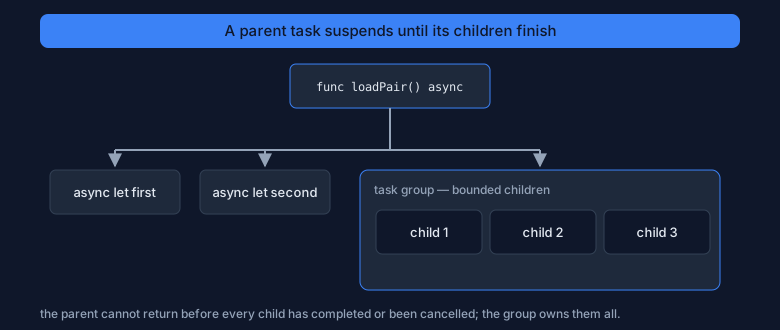
Figure 1 — children hang from a parent. The parent suspends while awaiting them, and it cannot return before all of them have finished.
Cancellation
Cancellation in Swift is cooperative: marking a task cancelled sets a flag, and it is the task's own job to check it. Nothing is killed abruptly, so no lock is left half-held and no buffer half-written.
let task = Task {
    for id in 1...100 {
        // Check before each unit of work: a cancelled task should stop promptly
        // and release whatever it is holding.
        try Task.checkCancellation()          // throws CancellationError if cancelled
        print(await fetchTitle(id: id))
    }
}

// Meanwhile, somewhere else: the flag is set, the loop notices, and the work
// unwinds through the normal error path.
task.cancel()

// `Task.isCancelled` is the non-throwing check, for cases where a partial
// result is still useful.
func sum(over values: [Int]) async -> Int {
    var total = 0
    for value in values {
        if Task.isCancelled { break }         // stop gracefully, keep what we have
        total += value
    }
    return total
}
Long-running work that ignores the flag cannot be stopped, so place the check where it costs little and catches the most: at the top of a loop, before and after an expensive step, and before touching a shared resource.
Actors & Data Isolation
Everything so far was safe because data did not move between places. The moment two tasks touch the same mutable state, you need a rule. An actor is a type whose rule is built in: only one task at a time may run its isolated code.
Actor Types
An actor is declared with the actor keyword and looks like a class with one difference that changes everything: access to its mutable state is serialised. You do not write locks, and you cannot forget one.
// The actor protects `value`: the compiler allows only one task at a time to
// run the code that touches it.
actor Counter {
    private var value = 0

    func increment() -> Int {
        value += 1               // safe without a lock: access is serialised
        return value
    }

    func current() -> Int { value }
}

let counter = Counter()

// Calling an actor method from outside is asynchronous, because the call may
// have to wait its turn. That is what the `await` is doing.
let one = await counter.increment()
let two = await counter.increment()
print(one, two)                  // 1 2 — each update saw the previous one
The await is not an implementation detail you can skip: crossing into an actor is a suspension point, which is why calling it from a non-async context requires wrapping the call in a Task.
Isolated State Under Load
The value of an actor shows up when many tasks hit it at once. A plain class would lose updates; the actor cannot, because the increments cannot interleave.
// One hundred tasks, each adding one. With a class plus no locking, the final
// count would be unpredictable: two tasks could read the same old value.
await withTaskGroup(of: Void.self) { group in
    for _ in 1...100 {
        group.addTask { _ = await counter.increment() }
    }
}

print(await counter.current())   // always 100 — the actor never loses an update
Inside the actor, the code is ordinary sequential code: no await is needed to touch value, because within its own isolation domain the actor already has exclusive access. The complexity moves to the boundary instead of into every access.
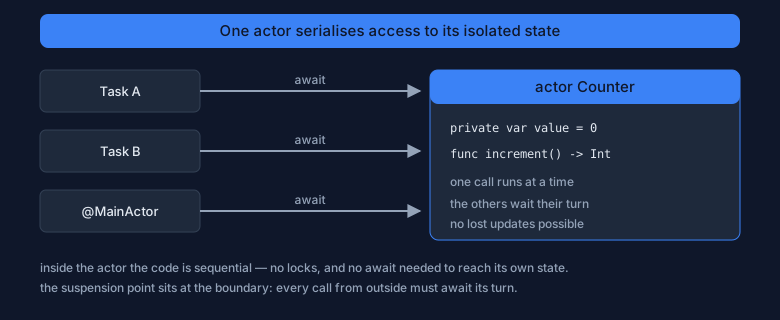
Figure 2 — many callers, one at a time inside. The actor serialises access to its state, and every call from outside crosses the boundary with await.
nonisolated Members
Not every member needs protection. An immutable stored property or a computed value that touches no state can be marked nonisolated, which removes the await from the call site.
actor Session {
    let id: String                   // `let`: immutable, so it is safe from anywhere
    private var hits = 0

    init(id: String) { self.id = id }

    // No isolated state is read here, so callers do not have to await.
    nonisolated var label: String { "session \(id)" }
    nonisolated func describe() -> String { "Session \(id)" }

    func recordHit() { hits += 1 }   // touches state: stays isolated
    func hitCount() -> Int { hits }
}

let session = Session(id: "s-1")

print(session.label)               // no await: nonisolated and pure
print(session.describe())          // same rule for a nonisolated method
await session.recordHit()          // await: crosses the isolation boundary
print(await session.hitCount())    // 1 — the isolated read also needs await
Marking something nonisolated is a promise that it does not read mutable isolated state. The compiler checks the promise; if the member touches hits, the declaration is rejected rather than trusted.
Sendable & MainActor
An actor makes state safe by keeping it in one place. A Sendable type is the opposite guarantee: the value is safe to send between places because it has no shared mutable state to corrupt.
Sendable Values
Value types whose stored properties are all Sendable are Sendable automatically, and so are actors. Classes are the interesting case: a mutable class can be shared safely only if it protects itself internally, and then you must say so explicitly.
import Foundation          // NSLock lives in Foundation

// A struct of value types: the compiler infers Sendable, and it can cross any
// boundary without copying problems, because each side gets its own copy.
struct Reading: Sendable {
    let sensor: String
    let celsius: Double
}

// A class that manages its own synchronisation. @unchecked means "I checked;
// the compiler cannot verify it" — an unsafe opt-out, never a shortcut.
final class LockedCache: @unchecked Sendable {
    private var values: [String: Int] = [:]
    private let lock = NSLock()

    func set(_ key: String, _ value: Int) {
        lock.lock()
        defer { lock.unlock() }      // unlock on every path, including throws
        values[key] = value
    }
}

// A closure passed to a task must also be sendable: it may run on another
// executor, so it may not capture a mutable class by reference.
let reading = Reading(sensor: "t1", celsius: 21.5)
let task = Task { reading.celsius }          // captured by value: fine
print(await task.value)                      // 21.5
When the compiler says "capture of a non-sendable type in a sendable closure", it is pointing at a real race: two executors could touch that object at the same time. The fix is usually to send a value copy, to move the mutable state into an actor, or to make the type immutable.
MainActor
User interfaces have one rule: touch them from the main thread. @MainActor states that rule to the compiler and gets the isolation for free — same mechanism as an actor, applied to the main thread.
// A client that can run anywhere.
struct SensorClient {
    func readings() async -> [Reading] {
        try? await Task.sleep(nanoseconds: 1_000_000)
        return [Reading(sensor: "t1", celsius: 21.5)]
    }
}

@MainActor
final class ViewModel {
    // UI state. Isolated to the main actor, so no other task may touch it.
    var rows: [Reading] = []

    func load() async {
        let fetched = await SensorClient().readings()   // may run on any executor
        rows = fetched                                  // back on the main actor
    }
}

// A closure body can be pinned to the main actor where it is created.
let model = await ViewModel()
await Task { @MainActor in
    await model.load()
}.value
Notice the shape of the code: the slow work is done off the main actor, and only the assignment to rows happens on it. That is the pattern for every interface that loads data — await somewhere else, then hop back to update the state the screen reads.
Global Actors
@MainActor is one example of a global actor: a named isolation domain that any type, function, or property can enlist in. You can define your own when a subsystem must always run on one serial queue.
// A global actor is declared once; every member annotated with it shares one
// isolation domain, exactly like the members of an actor instance.
@globalActor
actor DatabaseActor {
    static let shared = DatabaseActor()
}

@DatabaseActor
final class Store {
    private var rows: [String] = []

    func append(_ row: String) { rows.append(row) }   // isolated: no lock needed
    func count() -> Int { rows.count }
}

// From the outside, calls cross the boundary and therefore need await.
let store = await Store()
await store.append("row-1")
print(await store.count())        // 1
Use a global actor sparingly: it serialises everything annotated with it, which is exactly what you want for a database connection and exactly the wrong thing for a general-purpose helper. When in doubt, an actor instance scoped to the data it protects is the better tool.
Pitfalls & Practice
Concurrency bugs are rarely about syntax. They are about assumptions that stop holding once two tasks can interleave, and they tend to survive testing because they only appear under load.
Common Pitfalls
// 1. `await` in a loop is not concurrency. Each iteration waits for the last,
//    so the total time is the SUM of the parts. Use async let or a task group.
for id in ids { _ = await fetchTitle(id: id) }   // ids is some [Int]: sequential
await withTaskGroup(of: String.self) { _ in }    // concurrent instead

// 2. Actors are reentrant. State read before an await may be different after
//    it, because another call to the SAME actor may have run in between.
actor Store {
    private var items: [String] = []
    func replace(_ item: String) async {
        let previous = items                  // state A
        await Task.yield()                    // suspension: the actor is free to others
        items = previous + [item]             // may undo another call's work
    }
}

// 3. Never hold a lock across an await. The thread is released while the lock is
//    not, which is how deadlocks are built. Actors avoid this by design.

// 4. `Task { }` inside a loop creates unbounded unstructured work. Prefer a task
//    group with a bounded number of children.

// 5. Anything that touches the interface must be on the main actor, including
//    the small follow-up update after an await.

// 6. Not every problem is a concurrency problem. Parsing a small file or
//    formatting a string does not need a task; measure before adding async.
The first two items explain most real-world bugs of this kind, so re-read them until they are obvious. The others are rules about boundaries: where locks end, where tasks are allowed to multiply, and which domain owns the screen.
Practice Lab
Each experiment is small enough for a single file, and each one makes an invisible property visible.
- Sequential versus concurrent. Fetch three items in a loop, time it, then rewrite it with
async letand time it again. Explain the difference in one sentence. - Lose an update. Replace the actor in the
Counterexample with a plain class and run one hundred concurrent increments. Record the wrong result, then restore the actor and record the correct one. - Prove reentrancy. Add
await Task.yield()inside an actor method that reads and then writes state. Call it twice concurrently and explain the surprising result. - Cancel cleanly. Start a loop of one hundred iterations, cancel it after a few, and confirm the loop stops with a partial result instead of continuing.
- Hop back to the main actor. Write a
@MainActorview model that loads data through an async client, and show that moving the assignment to another actor produces a compiler error.
Concurrency closes the language itself: values, types, objects, protocols, generics, memory, and now overlapping work. Phase 4 continues with Packages & Modules, where this same code begins to live in separate libraries with a stated public surface.